Small business website design tips are essential for creating an effective online presence. They encompass strategies for planning, designing, optimizing, and maintaining a website that attracts customers and drives business growth. These tips help small businesses navigate the complexities of website creation, whether they choose to build it themselves or web development company.
The main benefits of implementing small business website design tips include enhanced credibility, increased customer reach, and improved marketing ROI. An effective website serves as a 24/7 marketing tool, providing potential customers with information about your products or services and enabling them to contact you easily. It also builds trust by showcasing customer testimonials and providing a professional online presence.
Small business website design tips are mainly used for planning a website, choosing the right domain name and hosting, designing the website (DIY or professional), implementing e-commerce functionality (if applicable), and optimizing the site for search engines (SEO). They also cover maintaining and updating the website to keep it fresh and secure, as well as measuring success through key metrics like traffic and conversions.
The main components of small business website design tips involve strategic planning, user-friendly design, SEO optimization, and ongoing maintenance. These tips emphasize the importance of a clear homepage, easy navigation, compelling call-to-action buttons, and essential contact information. By following these guidelines, small businesses can create a website that not only looks professional but also effectively engages web visitors and captures contact information, leading to increased business success.
Why Your Small Business Needs a Website
There’s no doubt that a website is essential for any modern business. In fact, according to Forbes, half of internet users form an opinion about a business based on its website design. A website provides your small business with a legitimate online presence, helping you reach new customers and showcase your offerings around the clock.
Here are some compelling statistics to consider:
- 72% of businesses have a website.
- Mobile devices account for 53% of website visits in North America.
- 297 of commercial transactions occur online.
- Visitors form an impression of a website in just 0.05 seconds.
- 49.6% of people will leave a site if they can’t find what they need within five seconds.
- 53% of visitors will abandon a website if it takes longer than three seconds to load.
(Source, Forbes)
Why a Website is Awesome
- Always Open: Your website operates 24/7, even while you sleep.
- Affordable Marketing: It’s a cost-effective way to market your business.
- Builds Trust: A professional website builds your credibility
- Know Your Customers: Website data helps you understand customer preferences.
- Stay Ahead: Many small businesses still lack well-designed websites, giving you the opportunity to stand out.
Addressing Common Concerns
- Cost: While there’s an initial cost, the long-term benefits are worth it.
- Technical Skills: Website builders and templates simplify the process, even for those with limited technical expertise.
- Time: Setting up a website takes effort, but the long-term rewards are substantial
Planning Your Small Business Website
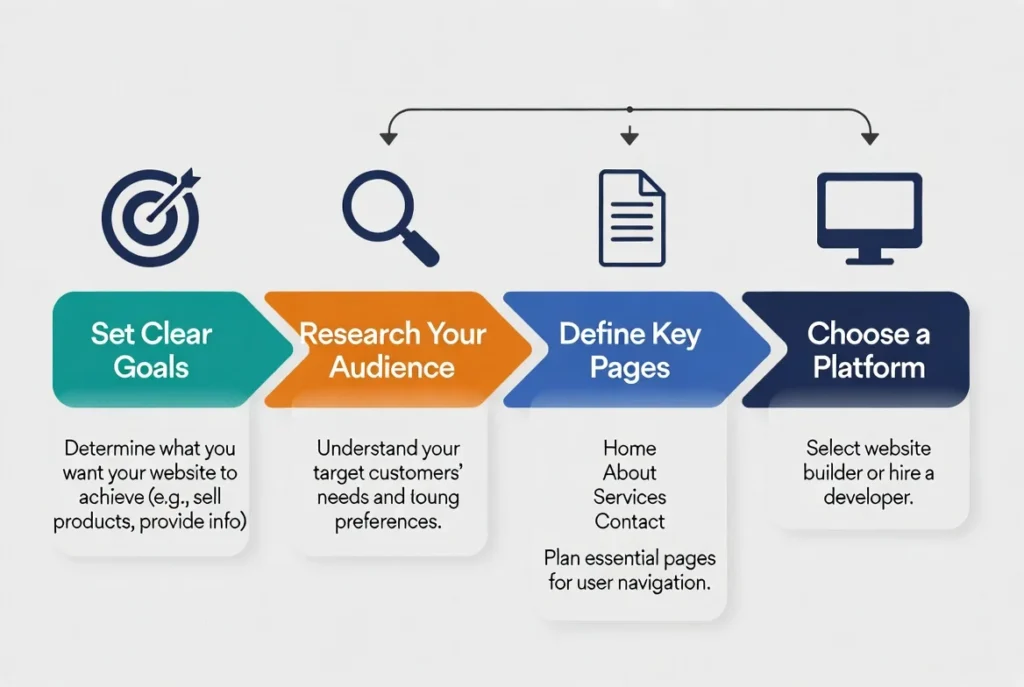
Before you start building your website, take the time to plan. Consider your goals, target audience, and the necessary pages. Essential pages usually include:
- Home: The main page that welcomes visitors.
- About: Tells your story and introduces your team.
- Services/Products: Details what you offer.
- Contact: Makes it easier for people to reach you.
Setting Goals and Knowing Your Audience
Goals: Determine what you want your website to achieve. Is it to generate leads, sell products, or provide information?
Audience: Research your customers to understand their needs. This helps you customized your website to be more appealing to your target audience. For example, Consider adding Google Reviews to your website.
Pro Tip: Make sure your website is mobile-friendly. Search engines like Google, Bing and DuckDuck Go prefer mobile-friendly sites, improving your search ranking. Our website design services can help you create a site that works on all devices. For industry-specific resources, consider options like Law Firm Website Marketing, Dental Website Marketing, or Lead Generation Websites for Contractors.
Choosing the Right Domain Name and Hosting
Your domain name is your web address, so make it memorable and relevant. Here are some domain name tips:
- Keep it Short: Simple names are easier to remember. For example, instead of “MarysCupcakesandTreats.com,” opt for “MarysCupcakes.com.”
- Use Keywords: Include your business name or what you do. If you run a landscaping business called “GreenScape,” a good domain could be “GreenScapeLandscaping.com”
- Avoid Numbers and Hyphens: These can be confusing. Instead of “Best4U-Flowers.com,” choose “BestFlowers.com.”
For hosting, you have a few choices:
Shared Hosting: A budget-friendly option where your website shares resources with other websites on the same server. It’s low cost and easy to set up, but performance can be slower if other sites use a lot of resources. It’s ideal for small personal blogs or simple business websites with low traffic.
VPS Hosting (Virtual Private Server): Provides more resources and better performance by partitioning a single server into multiple virtual servers. Each site gets its own dedicated portion of resources. It offers better performance and more control than shared hosting but is more expensive and requires some technical knowledge. It’s suitable for growing businesses that need more reliability and performance.
Dedicated Hosting: You get an entire server dedicated to your website, offering maximum resources and control. It offers the best performance and complete control over the server environment but is the highest cost and requires significant technical expertise. It’s best for large businesses or websites with high traffic that need top-notch performance and security.
Designing Your Website: DIY vs. Professional
Decide whether to build your site yourself or hire a pro.
DIY: Cheaper and you have full control over the process. Tools like WordPress, Wix, and Squarespace make it easier. The pros are lower cost, total control, and more flexibility, while the cons are time-consuming and have a learning curve.
Professional: More expensive, but you get a polished-looking website quickly. The pros are a professional look, time savings, and regular support/maintenance, while the cons are higher cost and less control over minor changes.
Essential Elements of an Effective Small Business Website
Your website should include:
- Clear Homepage: Visitors should immediately know who you are and what you do.
- Easy Navigation: Make it simple for people to find what they need.
- Call-to-Action (CTA) Buttons: Guide visitors on what to do next, like contacting you or buying something.
- Customer Testimonials: Reviews build trust.
- Contact Info: Make it easy for customers to get in touch on every page.
Additional must-haves include a blog for regular updates and improved SEO, an FAQ section to answer common questions, and AI-assisted web chat to help visitors 24/7.
Implementing E-commerce Functionality
If you sell products, consider adding an online store to your site. Ensure it’s secure and easy to use.
E-commerce tips:
- User-Friendly: Make it simple for customers to browse and purchase.
- Secure Transactions: Use SSL certificates and secure payment methods.
- Detailed Descriptions: Write clear, relevant, and attractive product descriptions.
- Include multiple photos: Products look more trustworthy when shown from different angles.

Maintaining and Updating Your Website
Keep your website fresh and secure with regular updates, including security updates and blog posts. Track performance and user engagement with analytics tools.
Maintenance tips:
- Update Content Regularly: Keep your information current.
- Security Updates: Regularly update website software to prevent hacking.
- Monitor Performance: Use tools to track your site’s performance and identify areas for improvement.
Measuring Success and ROI
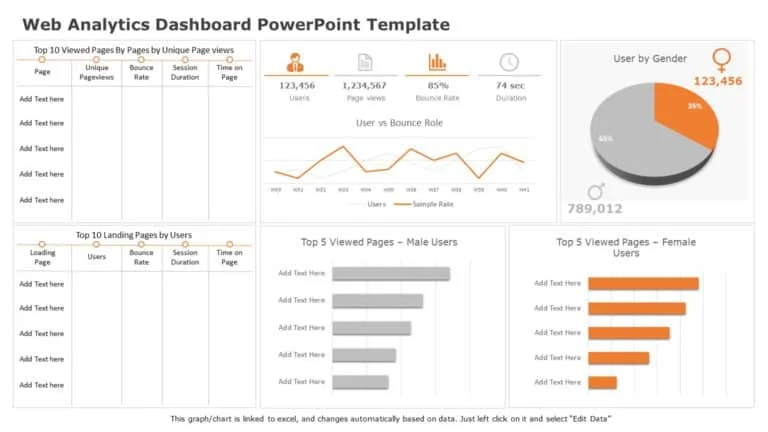
Check key metrics like traffic, conversions, and bounce rates to see how well your site is doing.
Metrics to Watch
- Traffic: Number of visitors to your site.
- Conversions: Actions taken by visitors, like form submissions or sales.
- Bounce Rate: Percentage of visitors who leave without interacting.
How You Can Use Data to Improve Your Website
User Behavior
Understanding how visitors interact with your website is key. Use tools like Google Analytics to track:
- Page Views: See which pages are most popular.
- Click Paths: Follow visitor paths to see where they spend the most time.
- Heatmaps: Visualize where users click, scroll, and spend the most time.
Test and Optimize
Experiment with different elements to see what resonates best with your audience.
Headlines: Test different headlines to see which grabs more attention.
CTA Buttons: Try different text, colors, and placements.
Layouts and Design: Experiment with different page layouts.
Content: Test variations in images, videos, and text formats.
Refine Strategies
Based on data and insights, update your website strategy. This can involve:
Content Updates: Regularly refresh your content.
SEO Adjustments: Use keyword data to optimize pages.
Design Tweaks: Make small changes to improve usability.
Performance Enhancements: Improve load times and overall performance.
Analyzing data regularly helps keep your website effective and engaging, driving more traffic, conversions, and growth.
Better Websites for Small Business Owners
A well-designed website can significantly benefit small businesses. Start building your website today with our easy-to-use solutions, and you’ll see the rewards.
Websites for Small Business Tips FAQs
1. What is a small business website and why do I need one?
A small business website is your always-on storefront. It helps customers find you, understand your services, and contact or buy from you. It builds credibility, supports local SEO, and captures leads, even after hours, so you don’t lose business to competitors with a stronger online presence.
2. How much does a small business website cost on a budget?
Costs vary by approach. DIY website builders can start under $20/month plus a domain. Custom sites often range from low four figures and up. Budget also for hosting, SSL, and maintenance. Start lean, then add features as traffic and revenue grow.
3. Should I build my website myself or hire a professional?
DIY is faster and cheaper for simple sites. Professionals deliver polished design, better performance, and less hassle. Many owners choose a hybrid approach: launch with a template, then invest in expert upgrades as needs expand, especially for SEO, accessibility, and speed.
4. What pages should every small business website include?
Start with Home, About, Services/Products, Reviews/Testimonials, FAQs, and Contact. Add booking or quote forms, a location/map, and a blog for SEO. Ensure clear calls-to-action on every page and a footer with your phone number, hours, address, and social media links.
5. How do I pick a domain name and hosting for my small business?
Choose a short, memorable domain that matches your brand and market (e.g., “CityService.com”). Avoid hyphens and tricky spellings. For hosting, ensure SSL, backups, and reliable support. Shared hosting suits beginners; upgrade to VPS as traffic scales.
6. How can you help with websites for small business?
We offers mobile-optimized sites, fast hosting, and built-in lead capture, plus local SEO, reviews, and web chat. That means one platform to attract visitors, convert them with clear CTAs, and route inquiries straight into your Inbox for quick follow-up.
7. What makes a small business website mobile-friendly and fast?
Use responsive design, compressed images, modern fonts, and lightweight code. Prioritize above-the-fold content, enable caching/CDN, and minimize third-party scripts. Test on real phones and audit with tools like PageSpeed Insights to keep load times snappy.
8. How do I optimize a small business website for local SEO?
Include city/region terms in titles, headers, and copy, embed a Google map, and align your NAP (name, address, phone) sitewide. Link to your Google Business Profile, earn reviews, publish local content, and build citations from reputable directories.
9. Can You handle online reviews, chat, and bookings on my site?
Yes. We can display reviews for social proof, add AI-assisted web chat to answer FAQs and capture leads 24/7, and integrate forms or booking flows. The result: more inquiries, fewer missed opportunities, and clearer reporting on what converts.
10. How do I keep a small business website secure and up to date?
Enable SSL, use strong passwords and two-factor authentication, keep themes/plugins updated, and run scheduled backups. Review analytics, fix broken links, refresh content, and test forms quarterly. A maintenance plan (in-house or managed) prevents costly downtime.